Working with unicode characters to add to CSS Blade.
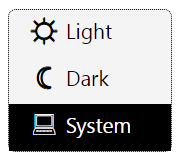
In particular, I am working on a Dark/Light/System mode drop down panel. I have used the switch or toggle to change between Light and Dark mode in the past. Now I want to add the option of System and that doesn't lend itself well to a switch or toggle.
I've seen it implemented as a dropdown before. I'm looking to implement this as a div with three inside divs (one each for Light, Dark, System). Click anywhere on the div, and the mode gets changed right away.
I ran into a slight obstacle along the way. Unicode characters are hard to control with css. They are very light and I wanted a slightly bolder appearance. You'd think adding "font-weight:700;" would work, wouldn't you? It did for two of the three icons. I have no idea why it didn't work for all three. Removing the CSS and adding a <b>...</b> tag had the same effect, one stubborn icon wouldn't go bold.
So what to do?
I added one line to the CSS and it worked perfectly. I have nine levels of bolding that I can apply too, instead of just two. Here's the code:
 text-shadow: 0.5px 0 0 #000, 0 -0.5px 0 #000, 0 0.5px 0 #000, -0.5px 0 0 #000;
notice the 0.5px for the weight definition. You can make that anywhere from 0.1px to 0.9 px (actually, you can keep going if you want, but then the weight becomes a black blob). The screen shot of what it looks like is at the right and shows a hover operation with the mouse pointer over the "System" line.
The CSS snippet looks is:
div.modeselect {
  background-color:#f4f4f4;
  border:1px dotted black;
  border-radius:6px;
  width:125px;
  > div {
    padding:0px 0 10px 15px;
    .uicon {
      display:inline-block;
      font-size:140%;
      position:relative;
      text-align:center;
      text-shadow: 0.5px 0 0 #000, 0 -0.5px 0 #000, 0 0.5px 0 #000, -0.5px 0 0 #000;
      top:2px;
      width:1.5rem;
    }
    &:hover {
      background-color:black;
      color:white;
    }
  }
}
And a PS: the advantage of using a character (unicode or otherwise) for this type of selector is that the character resolves well when switching between light, dark, and system modes. Other possibilities like SVG, or any other image, means that you need at least two images for the modes and a way to swap them out. A lot easier with a character, it's automatic.
Enjoy!