'Twas the day when CSS was useful – but not necessary. The limitations in the early days meant that it was a toss up between inline tags, styles, and floats.
One CSS framework stood out. Bootstrap was popular with its float based grid system. My take on it was that Bootstrap was bloated and added too much overhead to a project. There were too many "fixes" needed, and tables (at the time) served us sufficiently enough.
Along came a grid technology called flexbox and a slew of new CSS frameworks based on flexbox. One of those frameworks even took on Bootstrap with page elements and designs. So much so that Bootstrap also moved away from float based grids and implemented its grid system based on flexbox. While Bootstrap retains its dominance as the leading CSS framework, Bulma has made sufficient inroads.
I chose to use Bulma for its flexbox grid system ... before Bootstrap changed direction and adopted flexbox too.
So, why flexbox? Flexbox adds significant flexibility to page layouts. It also overcomes the float based grid issues of spacing, wrapping around, and the mix of horizontal and vertical spans.
There are a considerable number of CSS frameworks based on flexbox now. Some are wrong-headed in their approach, some are tied to other technologies that are impractical for most, and some are just forks of the top three – but too specific and or tied to another software package.
My opinion of Bulma isn't that good. Had I known of its limitations and quirks, I would have developed my own CSS framework. Now I am at the point where I am comfortable with my own fixes and enhancements that overcome Bulma's issues.
I will point out one major problem with Bulma: it is highly "opiniated". Bulma goes well beyond "normalize" and resets virtually zeros out all CSS tags. For example, the heading tags H1 through H6 are reduces to no size, no space, no margins, no padding. If you use the tag <h1></h1> you end up with text that is the same size and spacing as normal paragraph text. Ditto for the other heading tags. So if you want an <h1></h1> tag to produce the equivalent of a non-CSS <h1> tag, you have to specify it as <h1 class="is-1"></h1>. That is so counter-intuitive and counter-productive. If you have separate teams working on design/layout and content, the content folks are s-o-l. Someone will have to edit the content to confirm to the Bulma "way". BS. Life doesn't work that way.
One example I have just encountered is fieldset and legend tags. They also are zero'ed out. That means when I tried to use the fieldset and legend tags to "group" together some form elements, all I got was the equivalent of paragraph text. What I expected is to get a small border encapsulating a portion of the form (the fieldset, encapsulating fields), with a small title to help identify it (the legend portion).
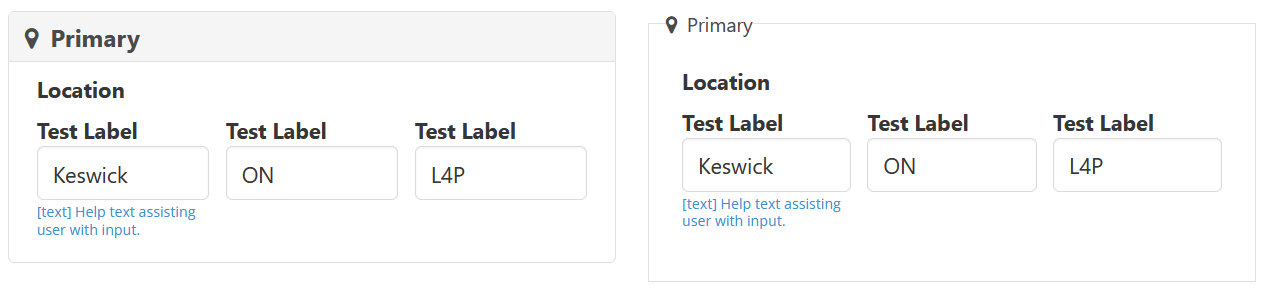 The photo at the right shows is split into two parts. The part on the right is the default behaviour of fieldset/legend with Bulma CSS form elements. To get that to display the default CSS values for fieldset and legend, I had to write my own CSS fix. (click on the image, by the way, to see a full size version).
The part on the left is a new CSS enhancement to match the rest of the form design and has a modern look. It's the same code for the form, with the tags slightly altered from <fieldset> <legend> </legend> </fieldset> to <fieldset class="fieldset"> <legend class="legend"> </legend> </fieldset>. And, yes, it's as simple as just adding the "fieldset" class to the fieldset tag, and "legend" class to the legend tag.
That new enhancement to the fieldset and legend tags will go into my overall enhancements as "forms.css" ... that will get loaded AFTER Bulma CSS and AFTER my "bulma-fix.css" that fixes a few other Bulma issues.
And I absolutely want to make it clear. I have two sets of fieldset/legend CSS. One is a fix that restores fieldset/legend to the CSS3 consortium defaults and the second is an enhancement (meaning "opinionated" to my preferences).
I also have "typography.css" that restores all the heading tags, ordered and unordered lists, among others.